Arrow Pro 3D
- 4.5
- Rating
- 1.00M
- Installs
- Free
- Price

 Analysis by App-foxy
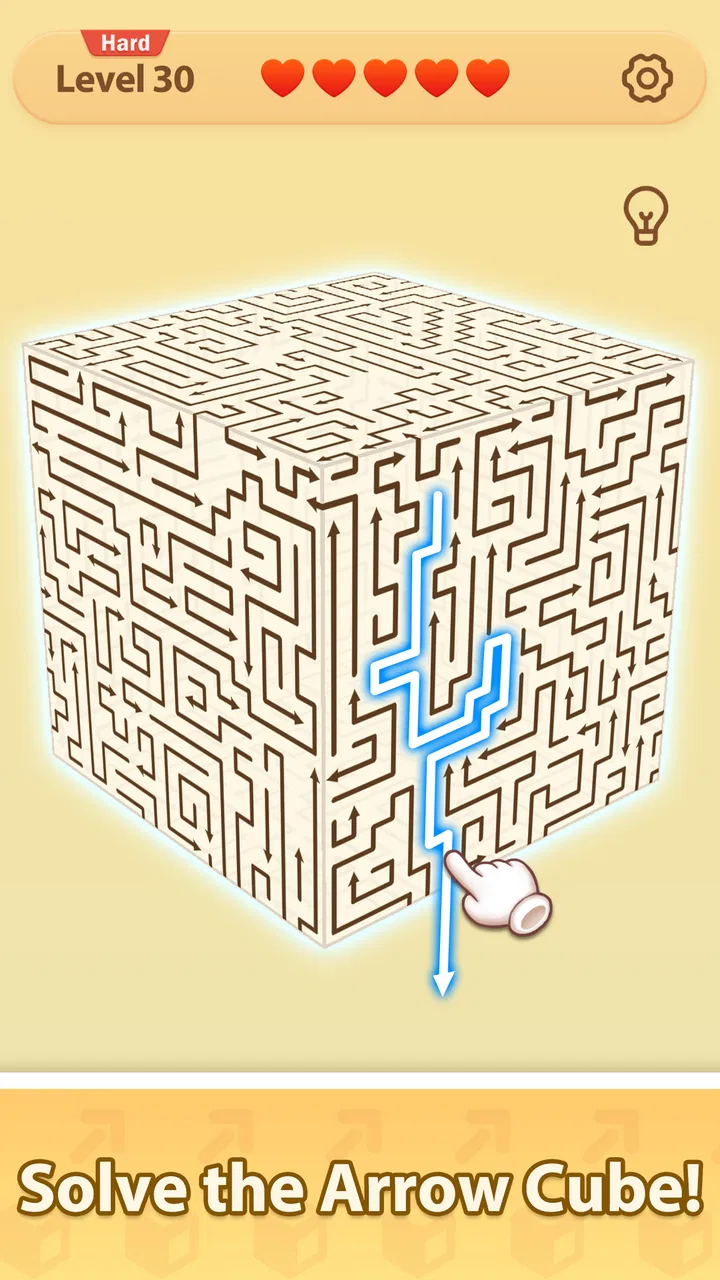
My first impression of Arrow Pro 3D was that it understands the appeal of a small puzzle very well. The board presents a three-dimensional cube filled with directional pieces, and the basic task is to rotate the view, clear paths, and find a way out. That sounds simple, but the spatial presentation gives each move more weight than a flat matching game. I found myself switching between quick guesses and slower inspection, especially when a path looked open from one angle but was blocked from another.
This is a free casual game from Iridium Mobile Team, aimed at Everyone and available for devices running Android 8.0 or later. It is also an approachable download for someone who wants a short mental break rather than a long story, competitive ladder, or complicated collection system. The game’s central idea is easy to understand almost immediately, which is important for a puzzle designed to be played in spare moments.
The current version is 1.12.0, and the game has already reached over 500 thousand installs with a 4.8 average from around 4.7 thousand ratings. Those figures suggest that its compact format has found a receptive audience, but I think the more useful question is whether the cube-based design suits the way you like to play. In my experience, it works best when you enjoy visual problem-solving and do not need a large amount of narrative or variety to stay interested.
You May Also Like

 Blood Strike: 2.5 Anniversary
Blood Strike’s Loadouts Turn Every Drop Into a Tactical Gamble
A close look at Blood Strike’s custom loadouts: how fast access to signature weapons reshapes its battle royale rhythm, rewards preparation, and narrows the gap between fights.

 Pandora - Music & Podcasts
Pandora’s Music Is Easy to Start, but Harder to Recover
Pandora’s strength is its low-effort path from a seed to a station. Its weak spot is how much confidence it asks you to place in connection, setup, and quiet recovery.

 8 Ball Pool
8 Ball Pool Is Built on Rivalries, Rematches, and Routine
A close look at the rivalries, rematches, shared routines, and unanswered safety questions that turn a quick pool match into a persistent mobile community.

 Samsung Music
Samsung Music’s Quiet Strength Is Playing What You Already Own
Its reach comes less from spectacle than from dependable access to a personal library. That simplicity is both the app’s strongest retention engine and its ceiling.

 AccuWeather: Weather Radar
AccuWeather Review: A Quick, Clear Forecast for Everyday Decisions
For everyday plans, the best forecast is the one you can understand quickly. AccuWeather makes rain timing, radar, and local conditions easy to act on, with a few trade-offs.

 Hill Climb Racing
Why Hill Climb Racing Still Turns Crashes Into One More Run
A tiny car, a bumpy hill and one more upgrade: Hill Climb Racing keeps resurfacing because its simple chaos makes every near-miss feel personal.
More From Our News Desk



How the cube creates its own visual language
The art direction is built around function first. The cube is not merely decoration; it is the language through which the puzzle explains itself. Arrows tell me where movement is possible, while the rotating viewpoint asks me to treat the board as a solid object rather than a collection of tiles on a screen. That distinction gives the game its identity and keeps the presentation tied to the act of solving.
I like that the three-dimensional setting makes observation part of the challenge. In a conventional flat puzzle, I can usually scan the whole arrangement in one glance. Here, I need to consider how the visible faces relate to one another and whether rotating the cube will reveal a useful route. The result is a pleasant tension between what I can see now and what I suspect is hidden around the next side.
The visual style also supports the game’s casual character. Nothing about the cube suggests that I need to study a long rulebook before playing. The shapes and directions communicate quickly, so the difficulty comes from arranging my thoughts rather than decoding an elaborate interface. That makes it suitable for a first session with no preparation, while still leaving room for mistakes caused by rushing.
One useful habit is to rotate the cube before touching a move whenever the layout feels confusing. It is tempting to follow the most obvious arrow immediately, but a full visual check often exposes a blocked route or a better order. I found this especially helpful when I was playing quickly and had started treating the puzzle like a flat board. The game rewards remembering that depth matters.
There is also a subtle trade-off in this presentation. Three-dimensional rotation can make a puzzle feel more interesting, but it can also make the state of the board harder to hold in my head. If you prefer perfectly transparent grids where every relationship is visible at once, this design may feel less comfortable than a traditional block puzzle. I consider that friction part of the appeal, but it will not suit everyone.
Why the setting stays playable instead of becoming decoration
The cube gives the game a coherent setting without forcing a fictional story onto the experience. I am not asked to follow characters or interpret a plot; I am simply working inside a compact spatial object. That restraint helps the mood remain focused. The setting exists to make the puzzle feel tactile and directional, not to distract me with unrelated content.
For everyday play, this makes the game easy to place in a routine. I can open it while waiting for a coffee, play during a short commute when I am seated, or use a few puzzles as a break between more demanding tasks. The visual language does not require a long warm-up, yet it gives my attention something more substantial than a purely reflex-based tap game.
The most interesting moments come when the cube’s appearance changes my understanding of the problem. A route that seems obvious from the starting view may become clearly wrong after a rotation. I began to treat each turn as an information-gathering step, not just a cosmetic adjustment. That is a stronger design choice than simply placing arrows on a colorful board, because the viewpoint itself becomes part of the solution.
Sound, rhythm, and the feel of a short session
The game’s mood depends heavily on pacing. Its core interaction is naturally quiet and deliberate: inspect the cube, rotate it, choose a path, and see whether the arrangement opens. That rhythm separates it from casual games built around constant tapping or rapid reactions. I could play in a relaxed way, but the act of solving still gave each session a clear beginning, middle, and finish.
I would describe the overall mood as focused rather than dramatic. The game does not need a sprawling setting to create a sense of progress. Instead, the satisfaction comes from watching a blocked arrangement become readable and then resolving it. That makes the experience a good fit for players who enjoy calm concentration, especially when they want something more active than scrolling but less demanding than a competitive game.
Sound works best here when it supports that rhythm instead of competing with it. The design leaves room for the player to concentrate on the cube, which matters because a sudden, overly busy presentation would undermine the careful observation the puzzles require. I tend to approach this kind of game as a quiet companion: something I can play with my own background audio or in a low-distraction environment.
That quiet pacing is also a limitation for anyone seeking constant excitement. If your ideal casual game is defined by rapid rewards, loud reactions, or a strong sense of spectacle, this may feel restrained. Arrow Pro 3D is more interested in the small mental click that happens when the route becomes clear. Its mood is coherent, but it is not designed to provide the energy of an arcade game.
One practical tip is to avoid judging a puzzle too quickly after a failed attempt. Because the game’s rhythm is based on spatial inspection, restarting immediately can lead to repeating the same assumption. I had better results when I paused, rotated the cube from a different angle, and asked which arrow was creating the blockage rather than simply trying another random move. That small change turned frustration into a more useful solving routine.
Where the pacing works in real life
Imagine having ten minutes before an appointment. A long-form adventure would be awkward because you may need to remember a story, manage several systems, or stop at an inconvenient point. A reflex game might be easy to start but leave you feeling overstimulated. This puzzle sits between those options: I can begin without preparation, focus on a contained spatial problem, and stop once my attention needs to move elsewhere.
It is also a reasonable choice for someone who wants a screen break with a little structure. Rotating the cube gives my hands something to do, while solving the paths keeps the mind engaged. I would not call it a mindfulness tool, but its measured pace can feel more settled than endless feeds or aggressively timed challenges.
The same quality can become repetitive if I play for too long in one sitting. The central interaction is deliberately narrow, so its strength is clarity rather than endless mechanical expansion. I would recommend treating it as a series of short sessions instead of expecting it to replace a larger puzzle adventure. That approach makes the focused mood feel intentional rather than limited.
How the mechanics fit the atmosphere
The main mechanic and the presentation are well matched because both ask me to slow down and inspect relationships. Rotating the 3D cube is not an extra gesture added to a standard puzzle; it changes how I understand the board. Clearing arrow paths gives the session a direct objective, while the escape-puzzle framing makes each successful sequence feel like a small release from confinement.
The best part is the way the game turns perspective into a decision. I am not only asking which arrow should move first. I am asking which face should I examine, which route is genuinely open, and whether the visible arrangement is misleading me. That creates a useful distinction between a careless solution and a considered one. The game’s casual label does not mean the spatial reasoning is empty.
At the same time, the rules remain accessible enough for a broad audience. The Everyone age rating reflects the uncomplicated nature of the concept, and the game does not rely on mature themes to create tension. A younger player can understand the goal quickly, while an adult can still appreciate the planning involved. The challenge comes from perception and order rather than from complicated character abilities or resource systems.
Compared with a usual flat tile puzzle, this offers more visual depth and a stronger sense of manipulating an object. Compared with a match-three game, it is less about pattern recognition at speed and more about planning a route. Compared with a word puzzle, it exercises spatial thinking instead of vocabulary. Those differences matter when choosing what to play: this is a better fit for someone who likes rotating shapes and tracing possibilities than for someone who wants constant novelty or quick combinations.
There is a clear trade-off against larger puzzle games. A story-driven title may offer richer context, varied objectives, and a stronger reason to continue beyond the next challenge. A physics-based puzzle may provide more experimentation. Arrow Pro 3D’s advantage is that it keeps its idea clean. I can understand what I am doing almost immediately, and the cube remains the focus rather than one system among many.
For players wondering whether it is truly free, the game is listed at no cost. That makes it easy to try without committing money at the outset. I would still approach it as a focused casual title rather than assuming that free means unlimited depth. Its value comes from how satisfying the cube puzzles feel in short bursts, not from promising the breadth of a premium puzzle collection.
Another practical consideration is device compatibility. The game supports Android 8.0 and newer, so anyone using an older system should check compatibility before planning around it. On a supported phone, the compact concept should make sense for casual use, but the quality of the experience will still depend on how comfortable you are viewing and rotating a three-dimensional board on a relatively small screen.
Who should play, and who should look elsewhere
I would recommend it to players who enjoy visual logic, compact challenges, and games that can be understood without a lengthy tutorial. It is particularly appealing if you like the feeling of examining a physical object from different sides. The cube gives the familiar escape-puzzle idea a distinctive spatial hook, and the relaxed rhythm makes it easy to fit into spare time.
I would be more cautious if you need a strong narrative, a large cast of characters, competitive features, or a constantly changing set of mechanics. This is not the right choice for someone who wants a game to occupy an entire evening with elaborate progression. It may also frustrate players who dislike perspective-based puzzles, since rotating the board is central rather than optional decoration.
For a child or family member, the simple premise and Everyone rating make it approachable, but I would still expect the three-dimensional viewpoint to require some patience. The game can teach careful observation naturally, yet it may not feel instantly easy just because the rules are simple. That is a useful distinction: accessible does not always mean effortless.
The developer, Iridium Mobile Team, has kept the concept recognizable enough that I can explain it in one sentence, but the interaction has more thought behind it than that sentence suggests. The game succeeds when it lets the visual design, sound mood, and puzzle rhythm reinforce one another. It is less successful if I expect a broad content package or a dramatic reason to keep playing after the spatial challenge stops feeling fresh.
My final atmosphere verdict
After spending time with it, I see Arrow Pro 3D as a calm, focused casual puzzle whose strongest feature is the agreement between its look and its play. The cube is the setting, the arrows are the visual grammar, and the measured rhythm gives each solution a modest but real sense of release. Nothing feels added merely to make the game appear larger than it is.
Its limitations are equally clear. The narrow central mechanic can become familiar, and the three-dimensional viewpoint may be less comfortable than a flat board for players who want instant visual certainty. It also does not replace a story-heavy puzzle game, a fast arcade title, or a deep strategy experience. I would choose it for deliberate short sessions, not for endless variety.
Still, the balance works for me. The free price lowers the barrier to trying it, the Everyone rating keeps the concept broadly approachable, and the substantial player response gives it a reassuring level of visibility. More importantly, the game has a specific personality: it wants me to rotate, inspect, and solve rather than rush.
My recommendation is simple: choose it if the idea of untangling arrow routes on a rotating cube sounds satisfying. Play slowly at first, use the viewpoint to gather information, and treat each failed attempt as a clue about the board’s structure. If that kind of quiet spatial reasoning fits your idea of a good break, this small game can create a surprisingly coherent mood from a very focused set of mechanics.
For me, that coherence is the reason to keep it installed. It does not need a dramatic world or a complicated progression system to be memorable. It takes one visual idea and makes the player interact with it from every side. That is a modest ambition, but when the pacing and presentation stay aligned with the puzzle, it is enough to make a short session feel purposeful.
FAQs for Arrow Pro 3D
01What is Arrow Pro 3D and how does the gameplay work?
Arrow Pro 3D is a casual puzzle game built around directing arrows through increasingly complex 3D levels. Your main task is to identify the correct order and path for moving arrows without allowing them to collide with obstacles or one another. The early stages are easy to understand, while later puzzles require closer observation, planning, and careful timing. It is designed for short sessions, making it suitable for quick entertainment.
02Is Arrow Pro 3D free to download and play?
Arrow Pro 3D is generally available as a free download, although the exact availability and pricing can depend on your Android or iOS region. The game may include advertisements, optional in-app purchases, or both. You can usually progress without paying, but purchases may offer benefits such as removing ads, unlocking content, or receiving extra resources. It is worth checking the store listing before downloading for the latest details.
03Does Arrow Pro 3D require an internet connection?
Many of the basic puzzles in Arrow Pro 3D can typically be played offline after the application has been installed, which is convenient when travelling or when mobile data is limited. However, an internet connection may still be needed for advertisements, purchases, updates, cloud-related features, or promotional content. Because requirements can change between versions, players should test offline access and review the current store description.
04Is Arrow Pro 3D suitable for children and casual players?
Arrow Pro 3D is easy to start because its core controls and objective are simple, making it accessible to casual players and older children. Nevertheless, the increasing difficulty can make some levels surprisingly challenging. Parents should also review the age rating, advertising practices, and in-app purchase settings on the relevant app store. The game does not usually rely on complex controls, but younger players may still need help with advanced puzzles.
05What are the main advantages and drawbacks of Arrow Pro 3D?
The main advantages of Arrow Pro 3D are its straightforward concept, fast-loading puzzle sessions, colorful three-dimensional presentation, and gradually increasing challenge. It can be a relaxing way to exercise visual planning and problem-solving skills. On the other hand, the experience may become repetitive for players who prefer deeper story-driven games, and advertisements or optional purchases can affect the flow. Device performance and the exact monetization model may also vary by version.
Pros
- Creates sharp
- realistic 3D arrow graphics for presentations and designs.
- Offers more control than basic arrow-drawing tools.
- Useful for diagrams
- maps
- tutorials
- and visual explanations.
- Can add depth and style to otherwise flat layouts.
- Suitable for users needing polished graphics without complex software.
Cons
- Advanced 3D effects may require time to learn and adjust.
- Export options may not meet every professional workflow.
- Detailed graphics can consume more storage than simple images.
- Some features may work better on newer devices.
- The app may feel excessive for users needing only basic arrows.

Arrow Pro 3D
Gallery